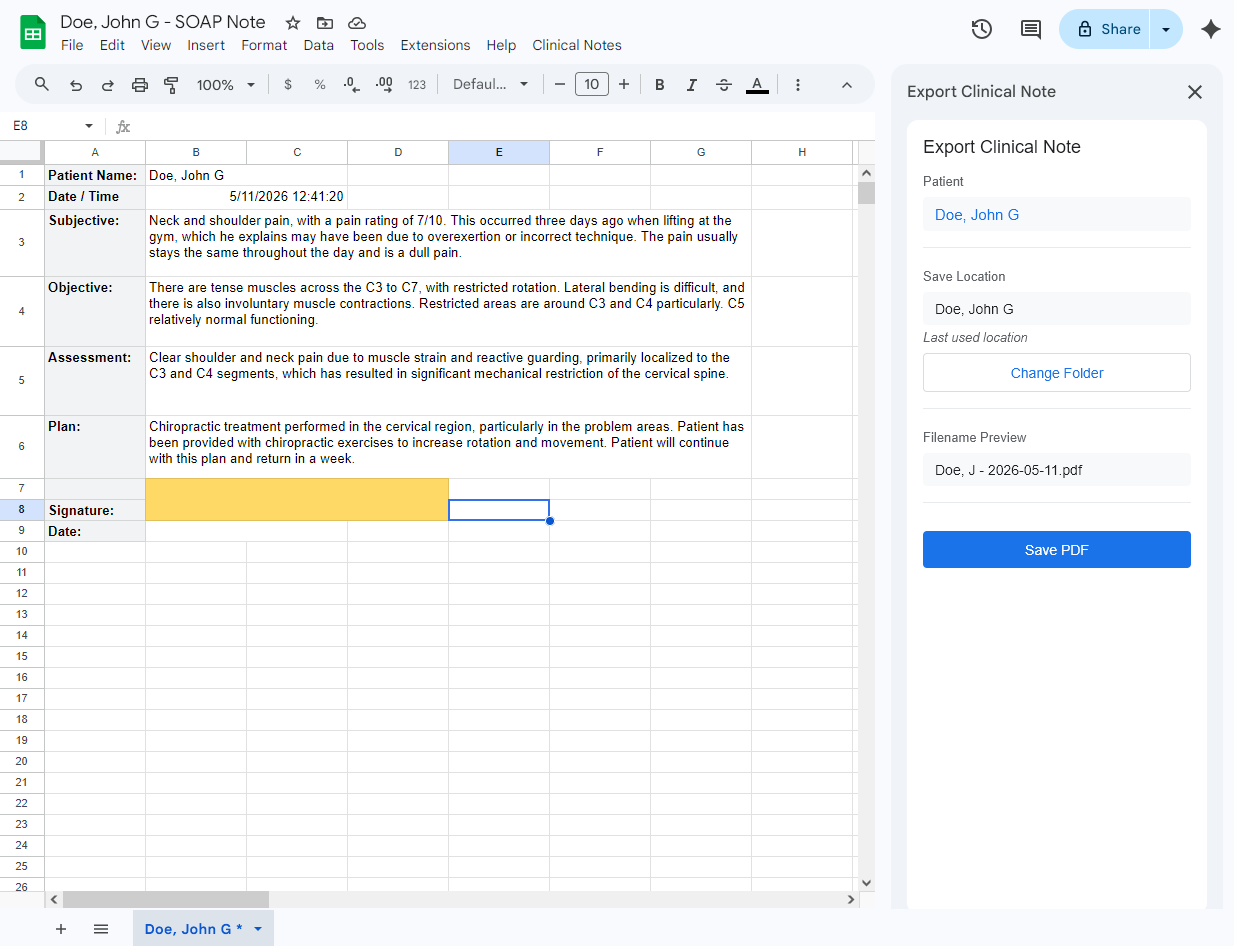
The Export PDF sidebar, showing patient name auto-detected, folder auto-selected, and filename preview ready to save.
A Google Sheets™ add-on that tracks your edits, timestamps your sessions, and exports clean PDFs to organized patient folders in Google Drive™. Install once — works in every Sheet.
Request AccessRequest access for direct install, or look for us on the Google Workspace™ Marketplace (coming soon).
The Export PDF sidebar, showing patient name auto-detected, folder auto-selected, and filename preview ready to save.
Everything you need to manage notes efficiently, nothing you don't.
Enter a name, click create. The add-on copies your template, creates a patient subfolder, and sets everything up automatically.
"Opened Date" fills when you start editing. "Signed Date" fills when you export. No manual entry needed.
A yellow cell and tab asterisk remind you when you have changes that haven't been exported to PDF yet.
Export a clean, timestamped PDF to the patient's folder. Filename and folder are auto-selected from previous use.
Each patient gets a subfolder. Working spreadsheets and exported PDFs are stored together, easy to find.
Works with any SOAP note layout. Configure your cell locations once on a master template, then create patients from it.
Configure once. Create patients in seconds. Export with one click.
Set up your master SOAP note template once — define cell locations, export range, and filename pattern.
Enter a name and click Create. A patient subfolder, working spreadsheet, and clean template are ready instantly.
Edit normally in Google Sheets™. Timestamps and dirty indicators update automatically in the background.
Click Export, then Save. A clean PDF is saved to the patient's folder with the correct filename. Done.
A short walkthrough of the full workflow — setup, patient creation, editing, and PDF export.
Covers template configuration, patient creation, editing workflow, dirty indicators, and PDF export.
The add-on operates entirely within your Google Workspace™. No external servers, no third-party services, no data leaves Google's infrastructure.
G4 Clinical Note Exporter is available now for healthcare providers using Google Sheets™. Request access and start organizing your clinical workflow today.
Request Access